Minecraft Monday- Animal Farming

Hey! It’s Nerdalicious again! Just the other day I was asking my younger brother what he always wanted to know when he started playing Minecraft. He said how to shear and dye sheep, it may sound amateur, but it gave me a great idea to do a beginner’s guide to animal farming in Minecraft. Plain and simple.

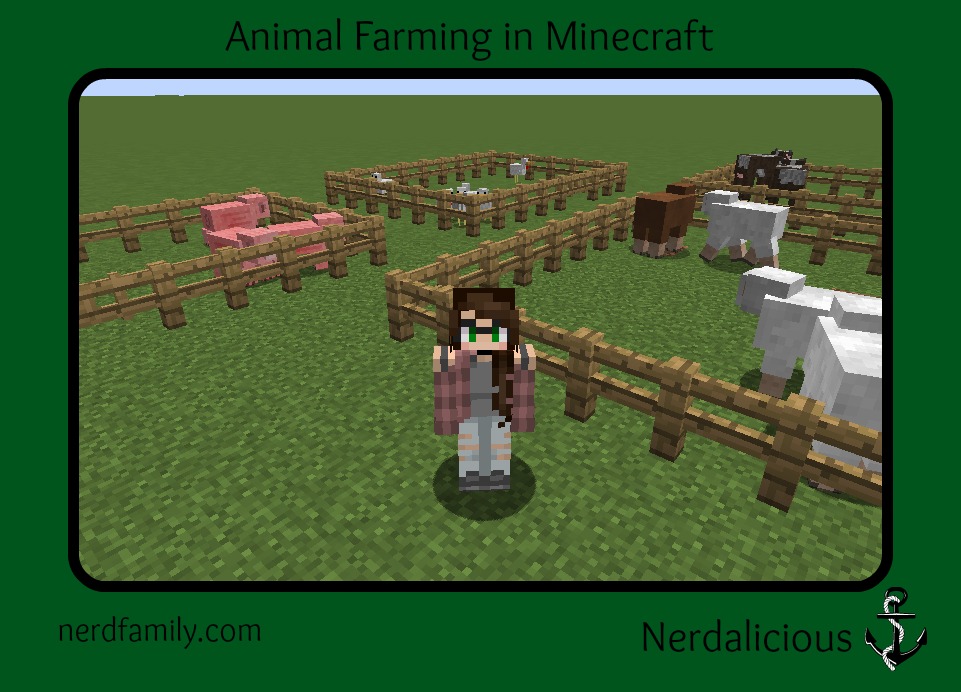
Ok, the first thing you’re going to want to do when you begin farming is getting lots and lots of fences, of course, that’s only if you’re in survival. It’s easier to write this post assuming you’re in creative. So that’s exactly what I’ll do. So, like I said, you’re gonna need fence, and fence gates, to create enclosures for your animals. There are of course, much more elaborate, and effective ways of doing this. But this one is much easier, and it keeps the animals in. So this is the one I use. 

Now onto the animals. I have decided to talk about the most common farm animals in Minecraft. I am speaking of course of pigs, cows, chickens, and sheep. I will address each of these animals in turn and give a brief summary of their use.

Sheep

Sheep are extremely useful farm animals because they are multi purpose. You can shear them, for wool, or kill them, for meat. When you shear a sheep, you obviously have to have shears in your hand, and all you have to do is right click it, it will usually drop 1-3 pieces of wool. When you kill a sheep, well, you kill it. Obviously, you can’t use it again, it will usually drop 1 piece of wool and 1-3 pieces of mutton. Oh, one other cool thing you can do with sheep, you can dye them! This is extremely useful, cause you use 1 dye and them whenever you shear the sheep it drops dyed wool instead of plain. Also when you mate 2 dyed sheep, say yellow and red, you get an orange baby! However when you mate two colors that don’t mix, say pink and light blue, the baby will be either pink or light blue.

Cows

Cows are also very useful, cause they are also multipurpose. You can milk them, or of course, you can kill them. When you milk a cow you simply right click it with a bucket, and it fills with milk. Milk is very useful as both a poison antidote and a crafting item. When you kill a cow, it will usually drop 1-3  pieces of beef, and sometimes 1 piece of leather.

Chickens

Chickens can be useful, but you should usually have them in large quantities. Because they are so easy to kill. They give you eggs, and if you kill them they will usually give you 1 feather and 1 chicken.

Pigs

Pigs are not very useful other than the fact that you can ride them using a saddle and a carrot on a stick, and you can kill them to get 1-3 pork chops. I mostly keep them around because, in my opinion, they are the cutest Minecraft farm animal; next to the baby chicken. đŸ™‚

Thank you for reading this article, I hope you liked it.

-Nerdalicious

Contesting Monday 9/11

So here is the deal. If you are hosting a giveaway or have a post about someone’s giveaway just leave a link. Make sure this link is to the giveaway post itself and not just the blog or it will be deleted. If you listed it last week but your giveaway is still open, list it again! Also, your link must be to something family friendly or it will be deleted.

So now you need to add your giveaways and go enter some giveaways! Let them know that Contesting Monday sent you! Make sure you share Contesting Monday with your fans and followers so that they can see all these fabulous giveaways!!

Minecraft Monday- Cactus Farming

Minecraft_Monday_Cactus_Farming

Hey! Today I’m going to teach you about cactus farming. Now, efficient cactus farming is a little tricky, because to do it correctly you need to build a special type of farm. It’s not very complex, but it is hard to explain. So I’ll try to explain it the best I can. Just so you know, it might take a little while to work out all the kinks, and everyone does it a little differently. 

First, you’ll want to make a sort of shell by digging out a hole big enough to make enough space for cacti, you’re gonna want to place the cactus at least 1 block apart, and then fill the hole with water. Next, you’re going to make a row of a block on 1 side, and behind a row that’s 2 blocks high. Then put a piston on the 1 block row behind each cactus, and on the 2 block row put a lever behind each piston. 

When you want to harvest the cactus you simply right click the lever to push the piston and cat off the second block of the cactus. See, when something touches the cactus it will destroy it and every cactus block on top of it; and since you put it on the row of blocks except for the bottom. Then the cactus will begin it’s growing cycle again, and you won’t even have to replant.

Thanks for reading this, I hope you liked it!

-Nerdalicious

Contesting Monday 9/4

Contesting Monday2

I hope you are all having a fabulous Labor Day Weekend! What can be more relaxing than winning things?

So here is the deal. If you are hosting a giveaway or have a post about someone’s giveaway just leave a link. Make sure this link is to the giveaway post itself and not just the blog or it will be deleted. If you listed it last week but your giveaway is still open, list it again! Also, your link must be to something family friendly or it will be deleted.

So now you need to add your giveaways and go enter some giveaways! Let them know that Contesting Monday sent you! Make sure you share Contesting Monday with your fans and followers so that they can see all these fabulous giveaways!!

The Creation Crate Mood Lamp!

Creation Crate Mood Lamp

CUE FLASHBACK!

So one day, Mom and Dad called me into their office along with Nerdpie and said, “We got sent this buildable mood lamp from Creation Crate, and were wondering if you wanted to make it.” Nerdpie was like, “Kind of, but if Nerdster wants to, he can!” Of course, to this, I said, “I would really like to make the lamp! Thanks!”

 END FLASHBACK!

And here I am, a week or two later, and I learned a lot. A couple of things I learned are:

  • I learned about circuit boards.
  • I learned about charges and how they travel.
  • I (surprisingly) learned about programming.
  • I especially learned about inputting circuits and lining them up.
  • And I learned about CHIMICHANGAS!!!!!!!!!!!!!
This lamp was super fun to make and incorporated a couple of cool features and skills, including:
  1. Circuit boards
  2. Programming
  3. Troubleshooting and Debugging
  4. Wire attachment
  5. Proper care of wires and LEDs (I learned this one the hard way :)C. Let’s just say, there was supposed to be three LEDs.)
All in all, this was really fun to make. I only have a couple complaints.
1)The wiring is a little confusing.
2)It didn’t come with a power source.
But other than that, the lamp was perfect. I really enjoyed learning how to implement the programming to the board, and how to program the timer for switching colors. Arduino programming is like some of the languages I like, such as JavaScript, Es6, or Python, but it also has its own sort from combining languages like JSON, CSS, or C++. It was really interesting and taught me things I hope to use later in life. Maybe I can get a job making supplies for Arduino. That would be fun. This was a super fun project which was very educational and helped me brush up on my programming skills.  Over all, this was a great experience and I can’t wait to see what will come next time. I rate this creation crate… two enthusiastic thumbs up! Comment on what you think would be something cool to make!
 
NerdMom’s 2 cents:
 
I love Creation Crate and the idea of it! This is one of the first STEM/crafting kits that I have seen that is actually for kids 10 and up.  It is something you can use as an actual curriculum. They claim that if you do 12 kits you will have more hands on programming experience than 99% of college computer science students. The cost ranges between $22.50 – $29.99 just depending on if you go month to month or a year at a time. It was a great project and my son learned a lot. This would make a wonderful gift because it is very educational and very fun!
 
(Disclosure: We were given the Creation Crate by the company and this post contains affiliate links. That said, all opinions are ours and ours alone)
 

Minecraft Monday is Back!

Minecraft_Minday_is_Back
Ta-da! Minecraft Monday is back! I am Nerdalicious, a fan of Minecraft Monday, and friend of the Nerd Family. Anyway, I thought for my first post, I’d just do an intro to Minecraft- surviving the first night. Plain and simple. I’m sure Nerdpie did something of the sort, but it is my belief that everyone does things a little differently. So I hope you find this article informational.

Ok, when I play survival I generally play with the All Biomes setting, you can do this by entering advanced world settings, and selecting custom. Not that hard. After I enter the world, I usually make my way to a Savanah biome, although any biome with hills or mountains will work, as my preferred house is in the side of the mountain, it is convenient, and you get materials out of it. Of course for this house, you will need a pickaxe of some form, which requires basic materials and a crafting table. Once I make my house, I generally look for sheep to get wool for a bed. After that, you’re pretty much set for the first night, but if you have more time, you might want to get some basic necessities. 

I hope you liked it!

-Nerdalicious


Contesting Monday 8/28

Contesting Monday2

So here is the deal. If you are hosting a giveaway or have a post about someone’s giveaway just leave a link. Make sure this link is to the giveaway post itself and not just the blog or it will be deleted. If you listed it last week but your giveaway is still open, list it again! Also, your link must be to something family friendly or it will be deleted.

So now you need to add your giveaways and go enter some giveaways! Let them know that Contesting Monday sent you! Make sure you share Contesting Monday with your fans and followers so that they can see all these fabulous giveaways!!

Contesting Monday 8/21

Contesting Monday2

So here is the deal. If you are hosting a giveaway or have a post about someone’s giveaway just leave a link. Make sure this link is to the giveaway post itself and not just the blog or it will be deleted. If you listed it last week but your giveaway is still open, list it again! Also, your link must be to something family friendly or it will be deleted.

So now you need to add your giveaways and go enter some giveaways! Let them know that Contesting Monday sent you! Make sure you share Contesting Monday with your fans and followers so that they can see all these fabulous giveaways!!

Contesting Monday 8/14

Contesting Monday2
So here is the deal. If you are hosting a giveaway or have a post about someone’s giveaway just leave a link. Make sure this link is to the giveaway post itself and not just the blog or it will be deleted. If you listed it last week but your giveaway is still open, list it again! Also, your link must be to something family friendly or it will be deleted.

So now you need to add your giveaways and go enter some giveaways! Let them know that Contesting Monday sent you! Make sure you share Contesting Monday with your fans and followers so that they can see all these fabulous giveaways!!

Post-it Brand and Fiskars Unboxing

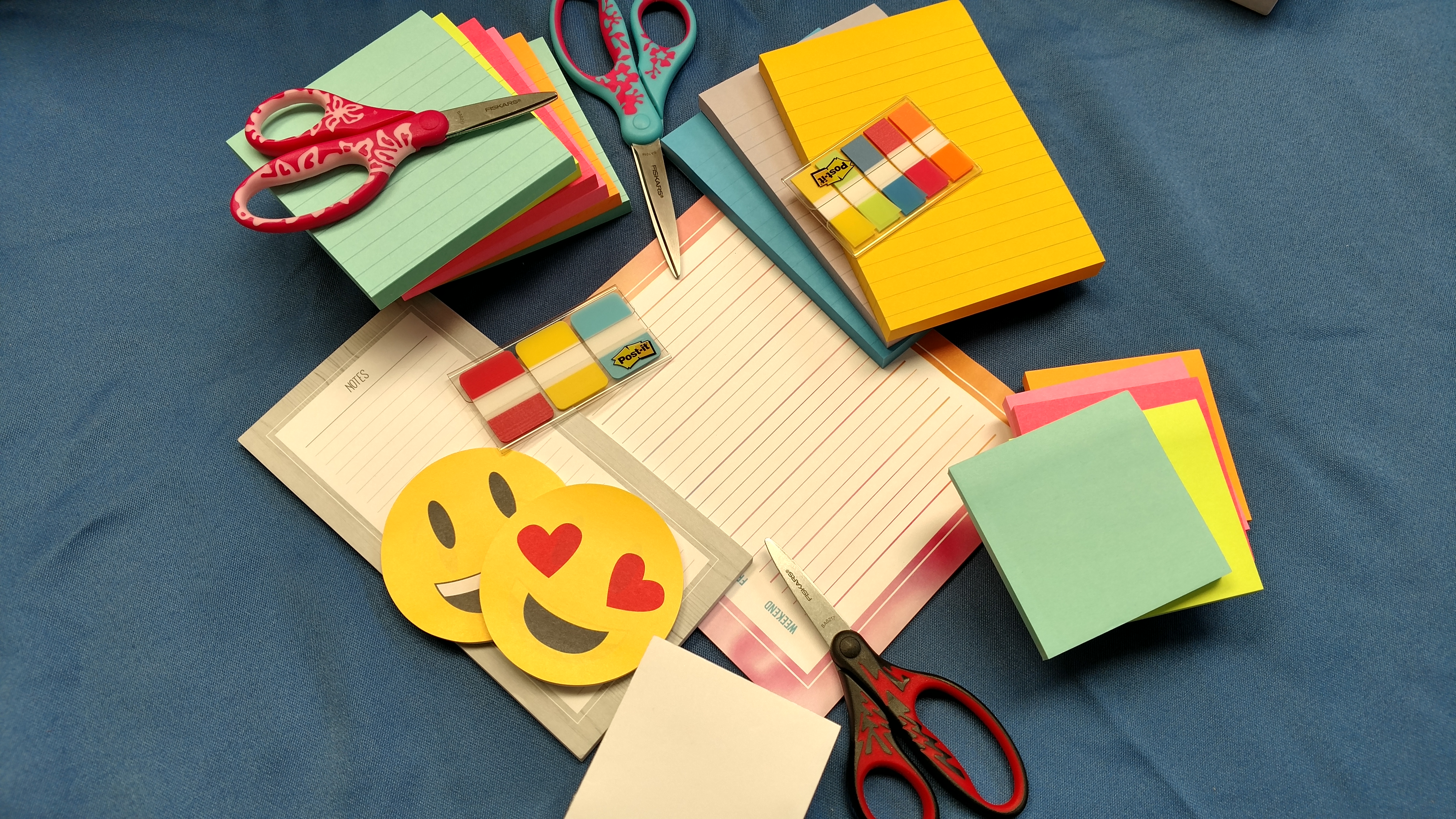
Who else loves back to school for the office supplies? I was stoked to receive a box of Post-it Brand and Fiskars products from them!

Confession, Post-its are a ride or die here in the NerdFamily. Generics just don’t stay sticky so when we buy pads to have on hand it is always Post-it Brand. Just about every pair of scissor you will find here, be they craft or general, are Fiskars. They are solid, stay sharp, and are comfortable in the hand. Due to those facts, I may have giggled like a little girl when I opened this box. So I had to show you all the coolness.

3Mproducts

(Disclosure: I was sent the products but all opinions are my own. I was not compensated.)

A Pro Nerd Family of Pro Family Nerds.